


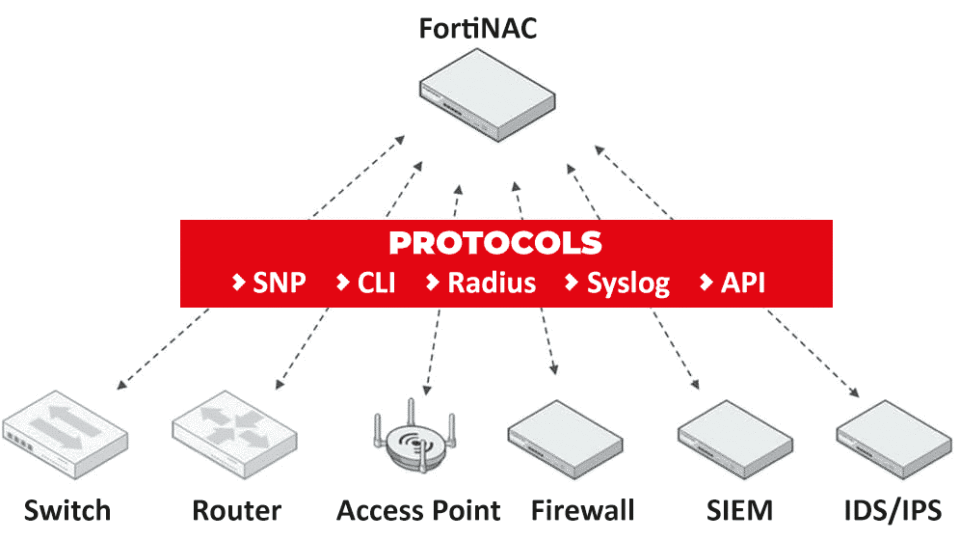
How FortiNAC Integrates With MDM and Third-Party Device
Modern organizations no longer manage only desktop computers. Employees connect through smartphones, tablets, laptops, IoT devices, printers, cameras, and remote endpoints every day. This rapid growth of connected devices has made network visibility and access control more important than ever.
That is where FortiNAC plays a major role. It helps businesses discover devices, verify security compliance, and control who or what can access the network. One of its strongest capabilities is its ability to integrate with Mobile Device Management (MDM) platforms and third-party security solutions.
By combining device intelligence from MDM systems with real-time network monitoring, organizations can build a stronger and more automated security environment.
Introduction to FortiNAC and Device Management
Network access control has become a critical layer in cybersecurity. Companies need a way to identify every device entering the network and ensure it follows company policies before access is granted.
FortiNAC helps security teams automate this process. It continuously monitors connected devices and applies policies based on device type, user role, location, and security posture.
When integrated with MDM platforms, the system gains deeper visibility into mobile devices and endpoints, helping organizations improve compliance and reduce security risks.
What Is FortiNAC?
FortiNAC is a network access control solution designed to provide device visibility, automated response, and policy enforcement across enterprise networks.
It can detect both managed and unmanaged devices, classify endpoints automatically, and isolate suspicious systems before they create security problems.
The platform supports wired, wireless, remote, cloud, and hybrid environments, making it suitable for modern enterprise infrastructure. According to Fortinet documentation, FortiNAC integrates with multiple MDM vendors and uses API-based communication to exchange device data securely.
Understanding MDM Integration in Network Security
Mobile Device Management platforms help organizations manage smartphones, tablets, and laptops from a centralized system. These tools enforce security policies, install applications, and ensure devices remain compliant.
However, MDM solutions alone cannot fully control network access. This is where NAC integration becomes valuable.
When FortiNAC connects with an MDM platform, it can verify whether a device is enrolled, compliant, updated, and approved before allowing access to company resources.
This integration creates a stronger security framework by connecting endpoint management with network-level enforcement.
Why Organizations Need FortiNAC and MDM Together
Cybersecurity teams often struggle with unmanaged devices entering corporate networks. Employees may connect personal phones, outdated laptops, or unauthorized systems without IT approval.
Integrating FortiNAC with MDM platforms solves this problem by allowing organizations to:
- Detect unknown devices instantly
- Verify compliance status automatically
- Restrict non-compliant endpoints
- Improve BYOD security
- Automate onboarding processes
- Reduce manual security operations
This approach also improves user experience because compliant devices can connect faster without repeated manual approvals.
Key Benefits of Integrating FortiNAC With MDM Solutions
Businesses gain several advantages when combining NAC with mobile device management systems.
Improved Device Visibility
Security teams can identify operating systems, device ownership, installed software, and compliance status in real time.
Automated Policy Enforcement
Devices failing compliance checks can automatically be quarantined or redirected to remediation networks.
Faster Incident Response
If a compromised device is detected, FortiNAC can isolate it immediately to prevent lateral movement.
Better Compliance Management
Organizations can enforce security standards consistently across managed endpoints.
Reduced Security Risks
Unauthorized and unmanaged devices are prevented from accessing sensitive resources.
Fortinet documentation explains that FortiNAC continuously polls MDM systems to retrieve updated host information and health status.
How FortiNAC Communicates With MDM Platforms
FortiNAC uses API-based communication to connect with supported MDM platforms. The MDM server shares endpoint information such as:
- Device identity
- Compliance state
- Enrollment status
- Security posture
- User association
- Installed applications
When a new device attempts to connect, FortiNAC checks the MDM database to validate the endpoint. If the device meets policy requirements, access is granted automatically.
Fortinet documentation states that FortiNAC can register hosts using data retrieved directly from the MDM database and update records through periodic polling.
Supported MDM Platforms and Compatibility
FortiNAC supports integration with multiple MDM vendors and endpoint management platforms.
Commonly supported systems include:
- Microsoft Intune
- VMware Workspace ONE
- IBM MaaS360
- Jamf
- MobileIron
- Citrix Endpoint Management
- Google Workspace
- Fortinet EMS
Fortinet’s official documentation lists these integrations as supported through service connectors and APIs.
Device Visibility and Endpoint Identification
One of the biggest strengths of FortiNAC is device discovery.
The platform continuously scans the network and identifies connected endpoints using techniques such as:
- DHCP fingerprinting
- SNMP polling
- MAC address analysis
- Traffic behavior monitoring
- Switch and wireless controller integrations
This visibility allows organizations to distinguish between corporate devices, guest systems, IoT equipment, and potentially risky endpoints.
Automated Compliance Checks Through MDM Integration
Compliance validation becomes significantly more efficient when FortiNAC integrates with MDM systems.
For example, organizations can verify whether devices:
- Use encryption
- Have updated operating systems
- Run approved antivirus software
- Meet patch management requirements
- Follow company security policies
If a device becomes non-compliant, FortiNAC can immediately apply restrictions or redirect users to remediation portals.
Role-Based Access Control for Managed Devices
Not every employee requires the same level of access.
FortiNAC supports role-based access control, allowing administrators to create policies based on:
- Department
- Device type
- User role
- Security status
- Network location
For example, finance employees may access sensitive systems while guest users receive internet-only access.
This granular control improves both security and operational efficiency.
BYOD Security and Guest Device Management
Bring Your Own Device (BYOD) environments create additional security challenges.
Employees often connect personal devices that may not meet corporate security standards. FortiNAC helps organizations safely support BYOD initiatives by verifying enrollment and compliance before network access is granted.
Guest users can also be isolated through segmented network policies, reducing exposure to internal systems.
Integrating FortiNAC With Third-Party Security Devices
Beyond MDM systems, FortiNAC also integrates with third-party security infrastructure.
This includes:
- Firewalls
- Switches
- Wireless controllers
- SIEM platforms
- Endpoint security solutions
- Threat intelligence tools
These integrations allow organizations to build a connected security ecosystem where information is shared automatically across multiple platforms.
FortiNAC Integration With Firewalls and Switches
FortiNAC can work alongside network infrastructure devices to enforce security policies dynamically.
When suspicious activity is detected, FortiNAC can:
- Change VLAN assignments
- Block switch ports
- Restrict user sessions
- Trigger firewall policies
- Isolate infected systems
Community discussions among network engineers show that organizations commonly integrate NAC systems with firewalls and switches for dynamic policy enforcement and segmentation.
Connecting FortiNAC With SIEM and Security Tools
Security Information and Event Management (SIEM) platforms collect and analyze logs from multiple systems.
When integrated with SIEM tools, FortiNAC can share endpoint activity, suspicious behavior, and compliance events for centralized monitoring.
This integration improves threat detection and helps security teams respond faster during incidents.
API-Based Integration With Third-Party Platforms
Modern cybersecurity environments rely heavily on APIs for automation and interoperability.
FortiNAC uses APIs to exchange information with:
- MDM systems
- Cloud security platforms
- Identity management tools
- Security orchestration systems
- Monitoring solutions
API integration helps organizations automate workflows and reduce manual administrative tasks.
Real-Time Threat Detection and Automated Response
Cyberattacks move quickly, which means organizations need automated security responses.
FortiNAC can automatically react to suspicious behavior by:
- Isolating endpoints
- Revoking access
- Triggering alerts
- Updating network policies
- Redirecting devices to remediation networks
This rapid response minimizes the spread of malware and reduces operational disruption.
Network Segmentation Using FortiNAC Policies
Network segmentation is essential for limiting the impact of cyber threats.
FortiNAC helps organizations divide networks into smaller segments based on:
- Device type
- Compliance level
- User role
- Business function
For example, IoT devices can be separated from critical business applications, reducing exposure if one segment becomes compromised.
Managing IoT and Non-Traditional Endpoints
Many organizations now connect smart devices, surveillance systems, industrial equipment, and medical devices to enterprise networks.
These systems often lack traditional security controls.
FortiNAC identifies and classifies these endpoints automatically, helping administrators apply security policies without manual intervention.
Challenges in FortiNAC and MDM Integration
Although integration provides major benefits, organizations may still face challenges such as:
- API compatibility issues
- Legacy infrastructure limitations
- Complex network environments
- Device enrollment inconsistencies
- Performance tuning requirements
Fortinet documentation also notes that enabling constant health validation can create high query loads on some MDM servers.
Best Practices for Successful Deployment
Organizations can improve deployment success by following several best practices:
Start With Device Discovery
Identify all devices currently connected to the network before enforcing policies.
Use Gradual Policy Enforcement
Begin with monitoring mode before applying strict restrictions.
Segment High-Risk Devices
Separate unmanaged and IoT systems from critical infrastructure.
Maintain MDM Compliance Policies
Ensure mobile devices stay updated and compliant.
Monitor Integration Performance
Review API activity and system logs regularly to prevent bottlenecks.
Use Cases Across Enterprise Environments
FortiNAC integration supports multiple industries and environments.
Healthcare
Hospitals use NAC to secure medical devices and patient systems.
Education
Universities manage thousands of student-owned devices securely.
Financial Services
Banks apply strict access controls for regulatory compliance.
Manufacturing
Industrial organizations isolate operational technology systems from enterprise networks.
Corporate Enterprises
Large businesses automate endpoint access control across global offices.
Future Trends in NAC and Endpoint Security Integration
As organizations adopt hybrid work, cloud computing, and IoT technologies, NAC solutions will continue evolving.
Future trends may include:
- AI-assisted threat detection
- Deeper cloud integration
- Zero Trust security frameworks
- Enhanced behavioral analytics
- Automated remediation workflows
Businesses increasingly require security platforms that can communicate across multiple systems in real time.
Conclusion
FortiNAC helps organizations strengthen network security through intelligent device visibility, automated compliance validation, and seamless integration with MDM platforms and third-party security tools.
By combining NAC capabilities with endpoint management systems, businesses can reduce risks, improve operational efficiency, and maintain stronger control over every device connecting to their network.
As cyber threats continue to evolve, integrated security solutions like FortiNAC provide organizations with the visibility and automation needed to secure modern enterprise environments effectively.







Leave a Reply