


Revolutionizing Efficiency: The Ultimate Guide to Workflow Automation in 2026
In the modern business landscape, “time” is the most volatile currency. As organizations scale, the weight of repetitive, manual tasks often becomes a bottleneck for innovation. This is where workflow automation steps in—not merely as a trend, but as a fundamental shift in how work gets done.
By leveraging technology to execute tasks, transition documents, and share data between systems without human intervention, businesses can reclaim thousands of wasted hours. Whether you are a small startup or a global enterprise, understanding the mechanics of automation is the first step toward a friction-free future.
Understanding the Core of Workflow Automation
Workflow automation is the process of using rule-based logic to launch a series of tasks that run independently. Think of it as a digital “if-this-then-that” ecosystem.
The Anatomy of an Automated Workflow
To build a successful automation, you need to understand three primary components:
- The Trigger: An event that kicks off the process (e.g., a new lead fills out a form).
- The Action: The task performed automatically (e.g., sending a welcome email).
- The Result: The final outcome (e.g., the lead is added to your CRM).
Why Workflow Automation is Non-Negotiable in 2026
The shift toward automation is driven by more than just speed. It is about accuracy, employee satisfaction, and scalability.
Eliminating Human Error
Manual data entry has a high error rate. Automation ensures that data is moved between platforms with 100% precision, maintaining the integrity of your records.
Boosting Employee Morale
Top-tier talent doesn’t want to spend four hours a day copy-pasting spreadsheet rows. By automating the “boring stuff,” you empower your team to focus on high-level creative and strategic initiatives.
High-Impact Areas for Implementation
Where should you start? While every department can benefit, these areas offer the highest Return on Investment (ROI):
Marketing and Sales
- Lead Nurturing: Automatically send follow-up emails based on user behavior.
- Social Media Scheduling: Synchronize posts across platforms without manual logins.
Human Resources (HR)
- Onboarding: Trigger a sequence of documents and training modules for new hires.
- Leave Requests: Automate the approval chain from employee to manager to payroll.
Finance and Accounting
- Invoicing: Generate and send invoices immediately after a project milestone is marked “complete” in your PM tool.
Top Workflow Automation Tools to Consider
Selecting the right software is crucial for SEO performance and operational stability. Popular choices include:
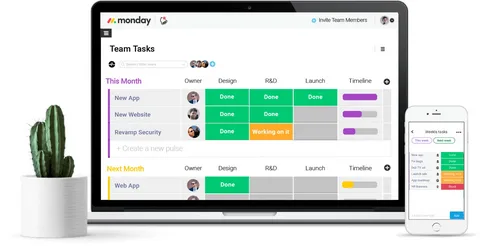
- Monday.com: Excellent for visual project management and cross-departmental automation.
- Zapier: The “glue” of the internet, connecting over 5,000+ apps.
- Make (formerly Integromat): Ideal for complex, multi-step logical workflows.
Strategic Steps to Build Your First Automated Workflow
Don’t automate a broken process. Follow these steps to ensure success:
Map the Manual Process
Visualize the current steps. Identify where the delays occur and which steps are truly repetitive.
Set Clear Goals
Are you trying to save time, reduce errors, or improve response rates? Defining your “Why” will guide your tool selection.
Choose Your Triggers Carefully
A trigger that is too broad will lead to “automation bloat,” while one too narrow might miss critical data.
The Role of AI in Advanced Automation
In 2026, automation is no longer just about linear rules. It’s about Intelligent Automation.
By integrating Large Language Models (LLMs) and Machine Learning, workflows can now:
- Summarize incoming emails and categorize them by sentiment.
- Predict when a project is likely to go over budget and notify stakeholders.
- Generate draft responses for customer support tickets based on past interactions.
Common Pitfalls and How to Avoid Them
Even the best-intentioned automation can fail if not managed properly.
Over-Automation
Automating every tiny detail can create a “black box” where human oversight is lost. Always maintain a “human-in-the-loop” for high-stakes decisions.
Neglecting Maintenance
Software updates and API changes can break “Zaps” or workflows. Assign a dedicated team member to perform monthly “health checks” on your automated systems.
Measuring the ROI of Your Automation Efforts
To justify the cost of premium tools, you must track performance. Key metrics include:
- Time Saved: Hours reclaimed per week/month.
- Cost Reduction: Savings on manual labor or error-related losses.
- Cycle Time: The speed at which a task moves from start to finish.
Security and Compliance in Automated Systems
Moving data between apps requires a robust security framework.
- Data Encryption: Ensure your automation provider uses end-to-end encryption.
- Access Control: Use the “Principle of Least Privilege” (PoLP) when granting apps access to your data.
- Audit Logs: Keep track of who created an automation and what data it touched.
Future Trends: What’s Next for Workflow Automation?
The future is Hyper-automation. This involves the orchestrated use of multiple technologies (AI, Low-code, RPA) to automate as many business processes as possible. Expect to see more “Self-healing” workflows that can identify their own errors and fix them without human intervention.
Conclusion: Building a Scalable Future
Workflow automation is no longer a luxury for tech giants—it is a survival requirement for any business looking to thrive in a digital-first world. By starting small, choosing the right tools, and focusing on high-impact areas like sales and operations, you can transform your organization into a streamlined, efficient, and highly profitable machine.
Stop working for your processes and start making your processes work for you.
FAQs: Everything You Need to Know
1. Is workflow automation expensive?
It depends on the scale. Many tools offer free tiers for basic needs. However, the ROI usually far outweighs the monthly subscription cost through time saved and error reduction.
2. Do I need to know how to code?
No. Most modern platforms (like Monday.com or Zapier) use “No-code” or “Low-code” interfaces, allowing you to build complex systems using drag-and-drop editors.
3. Will automation replace my employees?
Automation replaces tasks, not people. It frees your employees from repetitive work, allowing them to engage in higher-value activities that require human empathy and creativity.
4. How long does it take to implement?
A simple email automation can be set up in 10 minutes. A complex, company-wide ERP integration might take weeks of planning and testing.

Leave a Reply